8x8 sold its platform in fixed bundles. A customer who only wanted Meetings still had to buy
a full tier, and every change meant a reseller filing a ticket with 8x8. I led design for
the experience that let resellers build their own packages and change them without waiting
on 8x8.
Problem: Rigid bundles forced customers to pay for unused features, and
routine changes needed 8x8 to step in.
My role: Lead designer for the Admin Console assignment experience;
later led design for the new Partner Portal.
Key decision: Shipped a flat partner-to-customer self-serve flow first
and deferred reseller hierarchies, so the core loop could be proven in alpha and beta.
Outcome: Shipped to partners after alpha and beta; supported 8x8’s
shift to consumption pricing.
Problem & Hypothesis
Partners were becoming 8x8’s main route to new customers, but every package change still
pulled 8x8 into the loop. 8x8’s partner page says
two out of three new clients were sourced by partners,
so tooling that kept partners dependent on 8x8 had a real business cost.
Who was affected
Resellers who package and assign 8x8 services to their own customers. Historically they
relied on 8x8-mediated buying and provisioning. That created overhead for 8x8,
especially with mid-size and smaller partners, and limited partner autonomy.
What broke
X-Series, 8x8’s fixed bundle tiers (X1–X8), bundled a fixed set of apps and services per
tier. A customer who wanted one capability, such as Meetings, still had to commit to a
tier and pay for the rest. Commercially, 8x8 was moving toward consumption while partners often
still billed customers monthly, so selling only what buyers wanted also meant a path to
better partner margin.
Direction came from partner research, customer account managers (CAMs), and repeated
sales pressure for mix-and-match packaging. The research finding was consistent: partners
wanted autonomy in assigning licenses, and flexibility in what they sold. A customer
might want Meetings only, without the other X-Series features. I interviewed five
partners before design started.
Hypothesis
The friction was not “partners need more screens.” It was a packaging and autonomy
mismatch: X-Series forced unused capability, and every common change needed 8x8. If
partners could compose what a customer buys and change it themselves, the business could
support consumption without raising its provisioning overhead, and without breaking the
UK license flows already in market.
Goals
Partner
Business
Assign only the capabilities a customer needs
Move partners toward modular consumption
Make common provisioning changes without 8x8
Reduce manual provisioning and support overhead
Preserve existing licensing during the transition
Problem framing: friction that made X-Series bundles fail partners and 8x8.
Role & Collaboration
I was lead designer for the Admin Console subscription-assignment experience, and later
led design for Partner Portal MVP 2.0, which connects partners into that flow.
Owned
The end-to-end Admin Console experience: information architecture, the assignment and
provisioning flow, and design reviews.
Joined mid-project
Partner Portal MVP 2.0 design and reviews with two external Salesforce
implementation teams. Portal login connects into the Admin flow I designed.
Influenced
Packaging model detail (including unit price), roadmap sequencing, visual QA, and
day-to-day engineering questions so licenses and packages could coexist with minimal
extra surface area.
Constraints I designed inside
New package assignment could not break existing license assignment for UK-first
customers, so engineering had to support both paths. Assignment changes also rippled
through storage policy, calling plans, and membership, and those surfaces needed
redesign to keep the console coherent.
Working with engineering
The calling-plan list is where design and engineering constraints met most directly. My
design notes record that the list would be populated dynamically, with plan choices made
in Salesforce PartnerXchange and cascaded into the Admin system, so the Admin UI could
not hard-code what a partner could pick. Another note records that the restricted “No
outbound calling” plan is added automatically in the backend and left out of the visible
list.
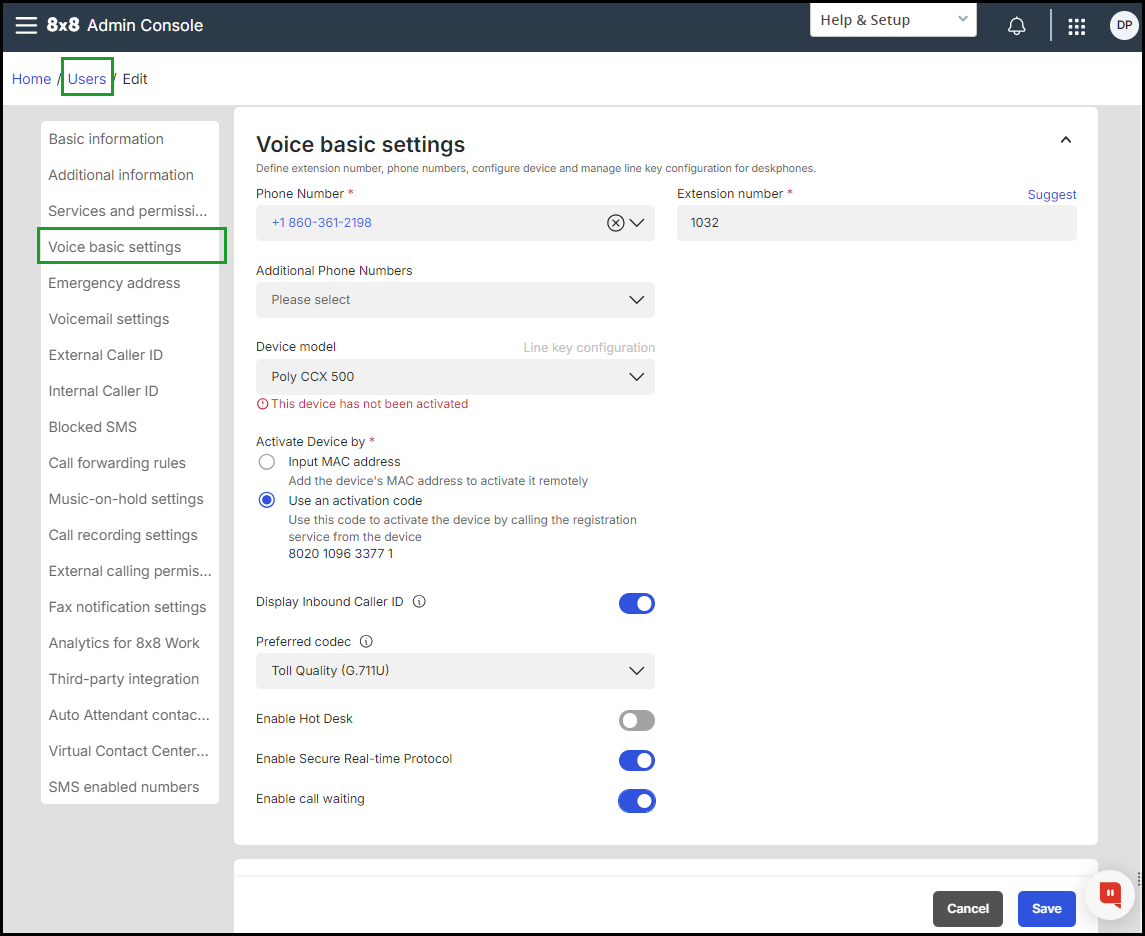
The platform team raised a concern about the MDN (phone number). After an admin assigns
a subscription that requires a calling plan, a phone number has to be set up. I changed
the design so the flow jumps straight to the Voice settings tab, where the admin picks
the number. For a user with an outbound calling plan, the tab shows both the extension
and the phone number, and the phone number is highlighted in red because the user cannot
be created successfully without one. The concern came up during design, in an engineering
design review.
Voice settings: after a calling-plan subscription is assigned, the flow jumps here so
the admin can set the required phone number.
One example of influencing packaging: I kept unit price out of the Admin Console. The
admin’s job is to provision and onboard users, not to calculate what a reseller charges,
and unit price is already listed in the Partner Portal.
Cadence: weekly product-led design reviews with PM, engineering, and research, plus
ongoing work with the Salesforce teams on Portal implementation.
Proposed Solution
Partners enter through the Portal, open the Admin Console, assign modular subscriptions
in a tabbed table, see dependencies auto-add with an explanatory banner, and confirm.
When a subscription needs a calling plan, the flow jumps straight to the Voice settings
tab so the admin can pick a phone number. It keeps the legacy license path and
phone-number-on-first-provision rules intact.
MVP partner journey and redesigned subscription assignment workflow.
Modular capabilities partners could compose beyond rigid X-Series tiers.
After: assigning modular subscriptions.
How the work moved. Partner research, CAM feedback, and sales pressure
became the packaging-versus-autonomy insight. I then iterated in the Admin
Console with weekly product-led reviews, and validated in partner alpha and beta.
Business rules kept changing mid-design: when calling plans returned as a parent–child
rule (add X, auto-add Y), a flat checklist stopped working and the UI needed explicit
dependency handling.
Decisions
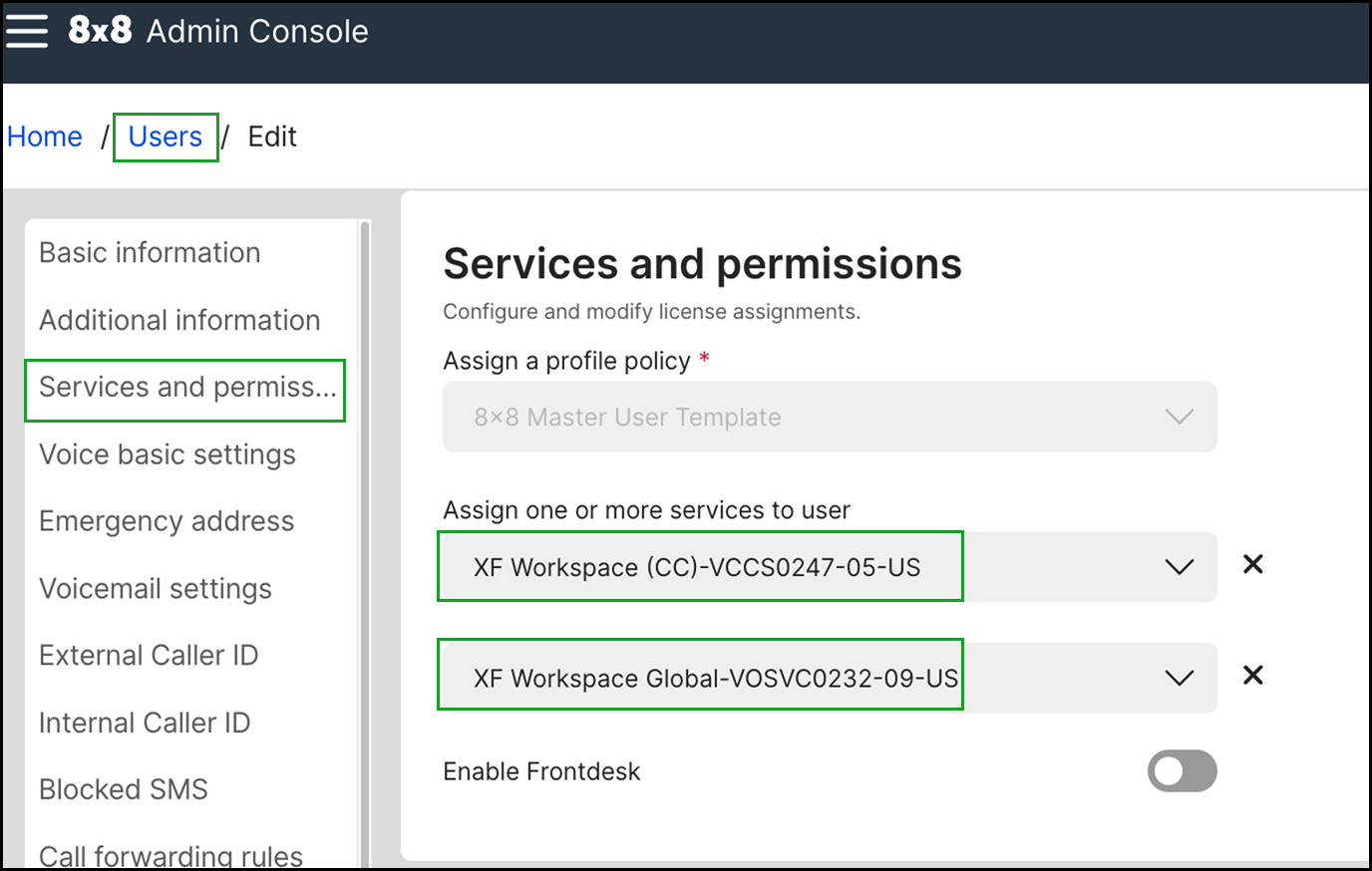
1. One table, with calling plans as a row
Chose: Tabs by capability area, so partners can browse and compose.
Subscriptions live in one table, and the calling plan is chosen with a dropdown
inside its row, so partners stay in context.
How the design moved. Each round was dropped for a specific reason.
Start, legacy progressive form. Built for picking an X-Series
tier step by step.
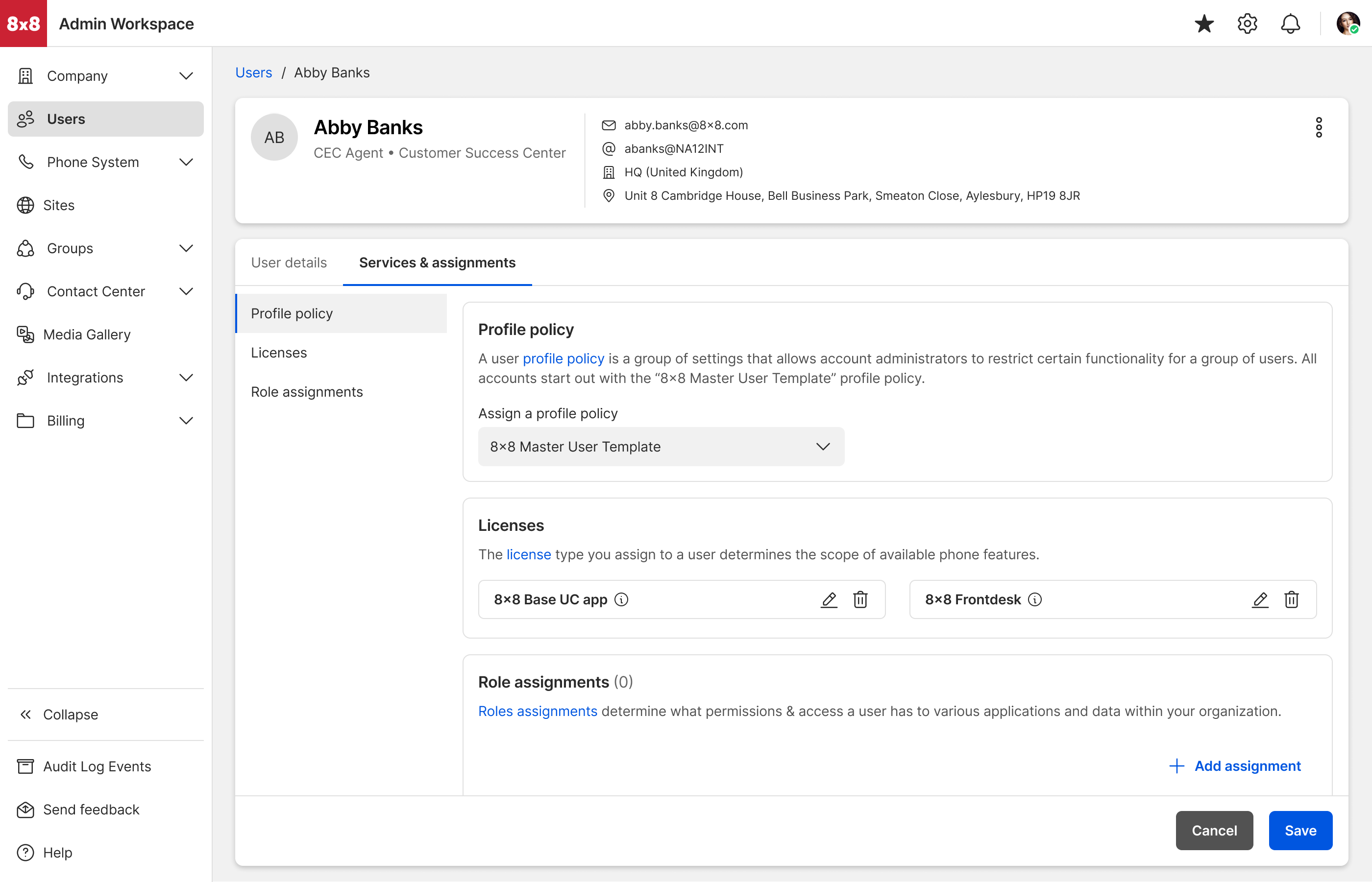
Round 1, carded per-user page. Profile policy, licenses, and
roles as separate cards, with licenses shown as chips with edit and delete icons.
Dropped: chips work for two licenses, not ten; adding opened a paginated
modal; and there was no place for calling-plan dependencies.
Round 1: carded per-user page — profile policy, licenses, and roles as
separate cards.
Round 2, one tab with stacked sections. Features first, calling
plans below. Dropped: a partner might have 10 subscriptions, which makes
one long page slow to scan, and calling plans below the fold were easy to ignore.
Round 2: one tab with features first and calling plans stacked below.
Round 3, separate Features and Calling plans tabs. Each had its
own Add button. Dropped: a calling plan depends on a subscription, so
splitting them across tabs made the admin switch tabs and use two Add buttons.
Round 3: Features tab, with its own Add button.
Round 3: Calling plans tab, with its own Add button.
Round 4, modal steps. Calling plans on a second step, as a table
or as a dropdown. Dropped: too many clicks to select just a few
subscriptions, and a second modal takes the partner out of context.
Round 4: calling plans on a second modal step, as a table.
Round 4: calling plans on a second modal step, as a dropdown.
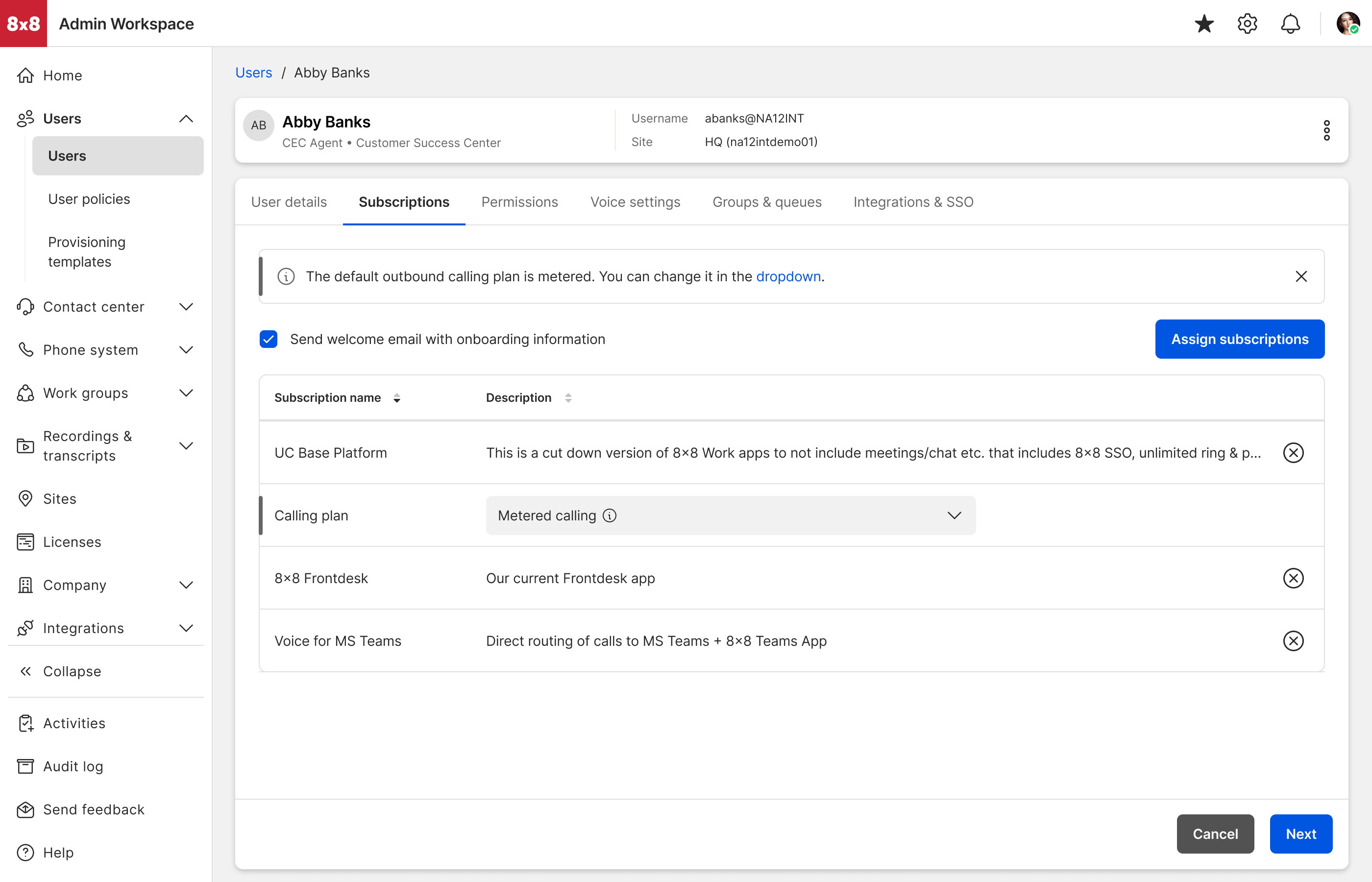
Shipped. One Subscriptions table with an Assign subscriptions
button, and the calling plan as a row with a dropdown inside it.
Shipped: one Subscriptions table with an Assign subscriptions button, and
calling plan as a row with a dropdown.
What it cost: A progressive form guides newer admins step by step.
Tabs trade that guidance for scanability, speed, and flexibility that power users
need when admins are editing complex content, not picking a tier. The in-row dropdown
makes the table row denser. A modal would have given each choice more room but broken
context.
Evidence: Weekly design reviews, and feedback from 25 partners in
alpha and beta, where tabs were easier to scan. Design reasoning for the in-table
dropdown: it keeps the partner in context, lowers cognitive load, and removes the
friction a second modal would add.
2. Auto-add dependencies with an info banner
Chose: Prerequisites auto-add and a banner explains why, so nothing
surprises the partner at confirm.
Options explored: Silent auto-add; warn-only, where the partner must
add prerequisites manually.
What it cost: Auto-add removes some control from the partner.
Warn-only would have kept it but risked incomplete configurations and tickets back to
8x8.
Evidence: Calling-plan parent–child rules arrived mid-project and
made the dependency visible. A note in the design file shows the banner is suppressed
when it would be redundant, for example when the base package is already selected.
The banner says the chosen subscriptions require UC Base Platform and that it was
selected automatically.
The confirm step splits “added automatically” from “added by you.”
3. Flat partner-to-customer MVP
Chose: Ship self-serve assignment for one layer: partner to
customer.
Options explored: Full hierarchy, including sub-contractors and
distributor markets.
What it cost: Partners with deeper structures were not served at
launch. Richer quote-based (CPQ) versus self-serve edge cases stayed outside the
first cut.
Evidence: Hierarchy multiplies information architecture and
permissions before the core loop is proven. The plan was to defer it until alpha and
beta showed the base path worked.
Impact
Shipped a self-serve loop under real constraints. Partners can now compose modular
subscriptions, enter from the Partner Portal, and change a customer’s setup without
filing a ticket. Legacy UK license flows kept working alongside the new model.
Validated by partners. Alpha and beta partners responded strongly to the clarity of
self-serve assignment, and their feedback shaped the final polish.
“We found the onboarding process straightforward, and the partner portal has been easy
to navigate… The system itself is easy to configure and use… saving us time and meaning
a better end-user experience… [which] will save us hours in handling support calls where
configuration changes are required.”
Moved the business model forward. Chrysalis was the admin foundation for 8x8’s shift
from per-user bundles to consumption pricing, a segment 8x8 reported growing about 60%
year over year.
What I’d measure next: ticket volume for routine partner changes, and
time from partner request to live configuration. Usage metrics were still being gathered
when I left.
Challenges Faced
The hardest constraint was that the Portal was greenfield and the Admin Console was not.
Everything I designed had to honor rules that were already in the product.
Technical
Admin had to keep legacy behavior, including tying a phone number to a user at first
create or provision. Dual license and package support was non-negotiable for UK
customers.
Organizational
Partner hierarchy was not ready, so the MVP stayed one flat layer. Richer
quote-based (CPQ) versus self-serve edge cases stayed outside the first cut.
Delivery
I designed bulk assignment for scale and it did not ship in the MVP, because of a
backend dependency and technical complexity. Table-based single assignment shipped
instead.
Explored but not shipped
Direction
What happened
Bulk assignment
Designed in depth, including a happy path, an add-Frontdesk variant, and handling
for mixed values when selected users differ. Deferred until the backend could
support it.
Partner customer-to-user navigation
Explored as post-MVP; not shipped.
Open questions I flagged but did not resolve
Microsoft Teams Operator Connect scenarios, where a customer holds hundreds of phone
numbers with no association to a user. I raised where those should live and did not
settle it in this release.
Hierarchy beyond one flat layer, including sub-contractors and distributor markets.
Post-MVP problem framing — complexity we could not solve in the first release.
Hierarchy and scale constraints deferred beyond the flat partner MVP.
Post-MVP / not shipped: partner customer-to-user navigation exploration.
Post-MVP / not shipped: bulk assignment designed ahead of backend support.
Key Learnings
Five things I would carry into my next project, and the last two are what I would change
about how I worked on this one.
Ship the autonomy loop before hierarchy. A flat partner-to-customer
layer unlocked self-serve value. Distributor layers would have delayed that proof.
Explain dependencies, do not hide them. Auto-add only worked once the
banner made parent–child rules visible, especially as calling-plan rules landed
mid-project.
Design ahead of the backend, but label it. Bulk assignment and deeper
navigation were right bets for scale. Keeping them clearly post-MVP preserved trust in
what actually shipped.
Get measurement into the MVP scope. Qualitative feedback told us the
design was clear. It could not tell us whether it reduced support load. Next time I
would agree on two or three metrics with the PM and engineering before launch, so the
outcome is a number and not an argument.
Log the decision when you drop a direction. I explored several
approaches to single-user assignment, and I did not record the moment and reason I
moved off each one. A one-line note on the frame at the time would have made this case
study, and the design reviews behind it, much stronger.