Problem & Hypothesis
Users
Primary users are 8x8 customer admins — both UC and
CC. Their job is to create, edit, and delete users,
including bulk edits when many changes are needed.
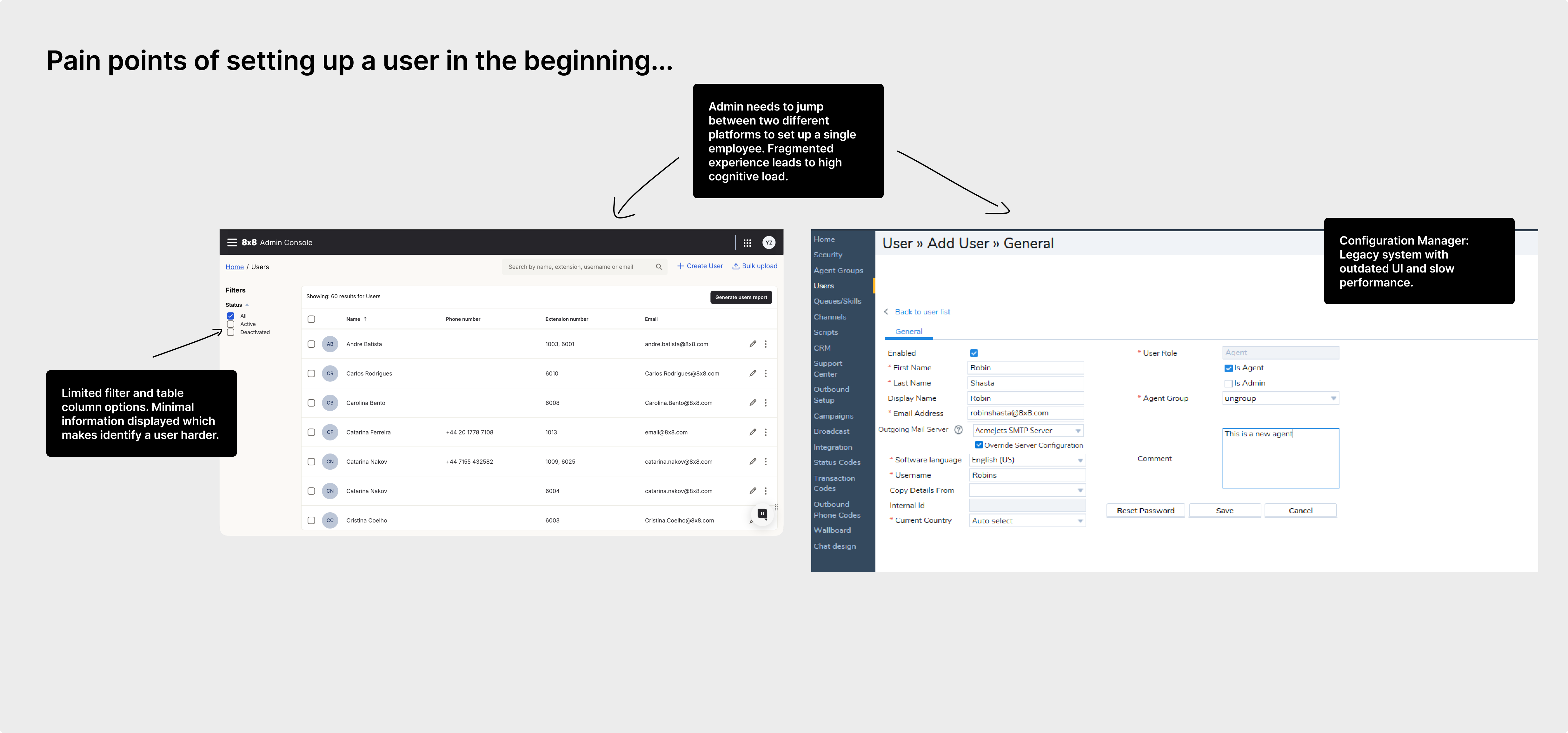
What “fragmented” meant
8x8 ran two admin systems. UC-only admins configured users in
Admin Console. Admins provisioning contact center agents still started
in Admin Console, then jumped to Configuration Manager to finish agent
setup — skills, queues, and fine-tuning. That split meant more context switching, higher
chance of incomplete setup, and slower agent provisioning.
Initiative context
The original Admin Workspace initiative aimed to bring UC and CC admin
into one experience for both admin types. When that broader effort was paused, I worked
with UC PMs to carry the new Admin Workspace patterns into the UC world —
still designing for two live scenarios:
- UC-only: provision with UC-side settings.
- UC + CC: complete both sets of settings for a fully provisioned agent.
Signals
Past research, usability testing with 8x8 customer admins (pain with the split), and
competitive studies showing more seamless configuration elsewhere.
Hypothesis
If identity, telephony, and CC agent config are modular but connected,
admins finish setup faster with fewer errors — without dumping everything into one
mega-form.
Success was judged mainly through qualitative admin feedback and
usability testing, not a measured completion-time study.
Role & Collaboration
I was the primary designer for user create/edit and NUME, working inside
an existing Admin Workspace IA set by a Staff Product Designer, with
UC PM and platform engineering. Line Key Config was a related spin-out,
not part of this write-up.
Owned
End-to-end user creation and user edit flows, plus NUME (asynchronous provisioning
when telephony steps fail or complete in the background).
Built on
Modular Admin Workspace IA (Users vs Contact Center). My job was to make create/edit
and recovery work inside that pattern.
Out of scope here
Line Key Configuration — a deeper redesign that became its own project, so designs
aren’t shown in this case study.
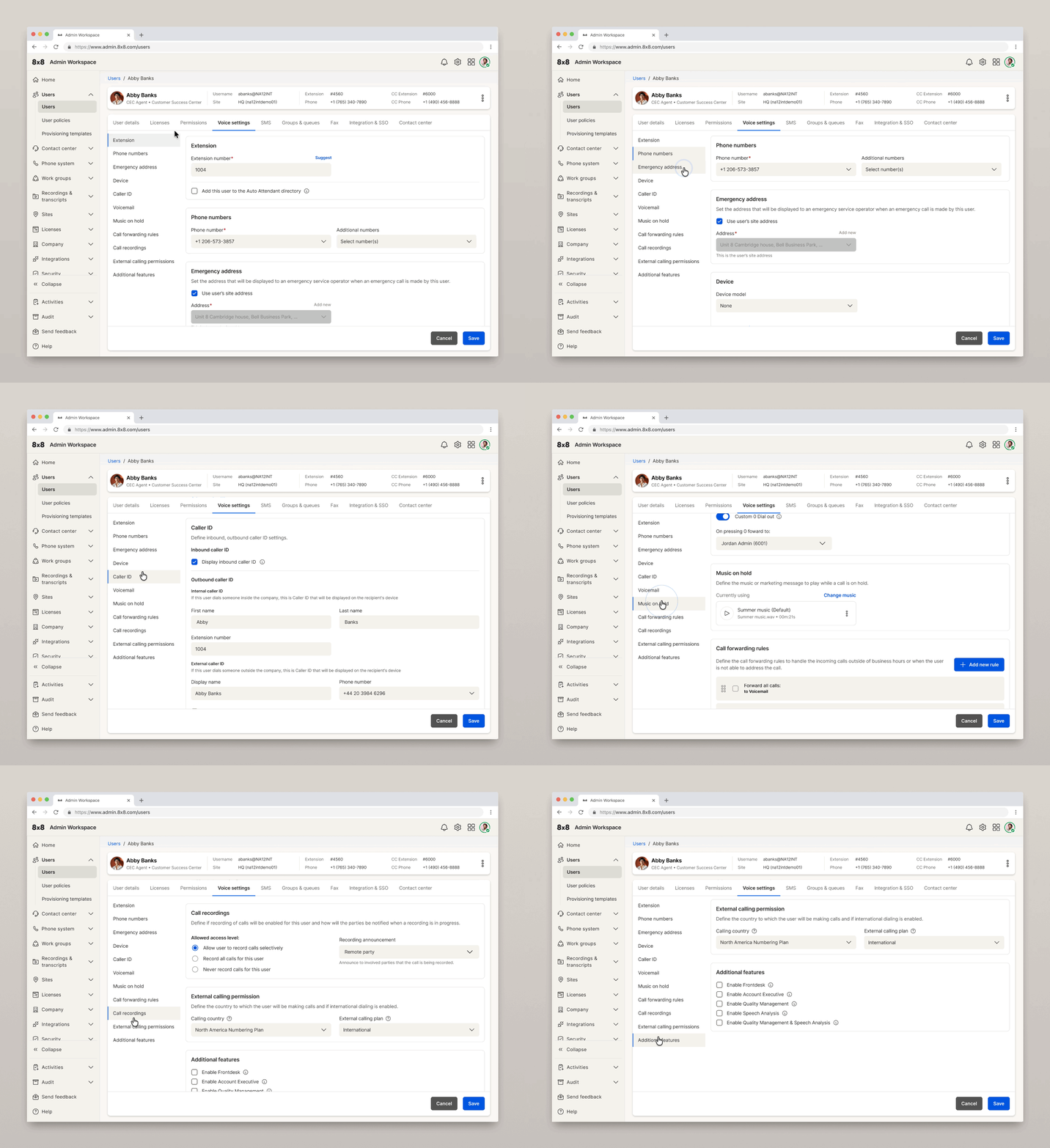
I broke the surface into trunks. Under Voice Settings — device/line keys,
voicemail, caller ID, music on hold, call forwarding, and more — I partnered with the UC
PM to simplify every selection, regroup sections, and redesign interfaces where old
patterns broke down.
Timeline: Chrysalis started first. When that design moved into engineering
handoff, I started User Management on the same Admin Console.
Proposed Solution
Methods
Setting-by-setting work with the UC PM, then NUME through multiple design iterations,
bi-weekly cross-functional syncs, and async prototype videos/links for a distributed team
(platform eng and UC PM).
Decisions
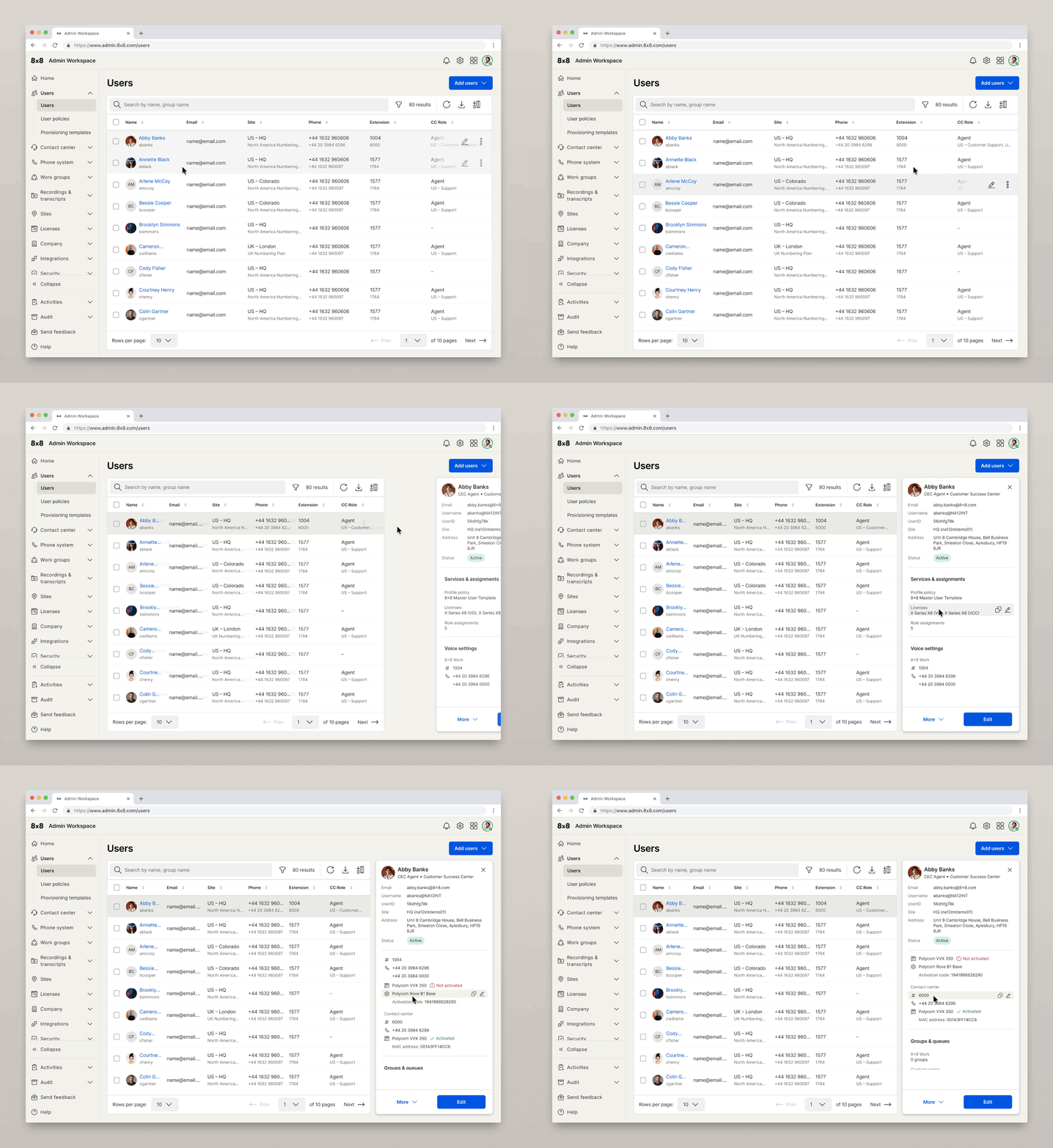
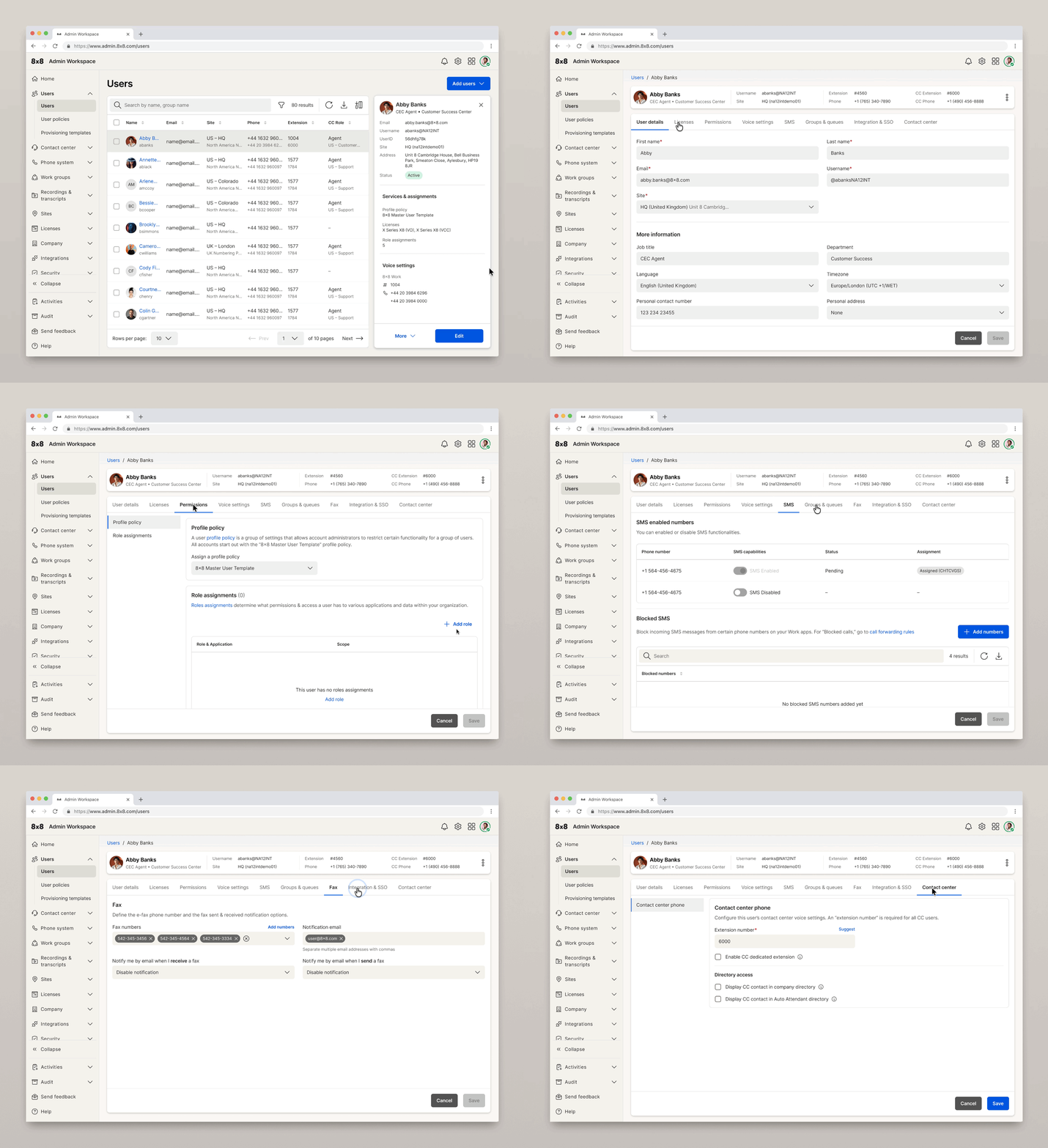
Tabs, not a mega-form
Tabs reduce cognitive load and hold clearer hierarchy — including table-of-contents-style
sub-navigation into nested settings — instead of one overwhelming form.
NUME: unblock partial failure
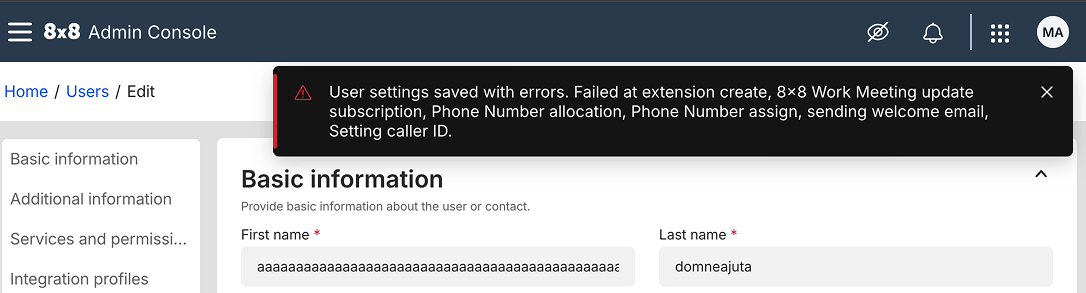
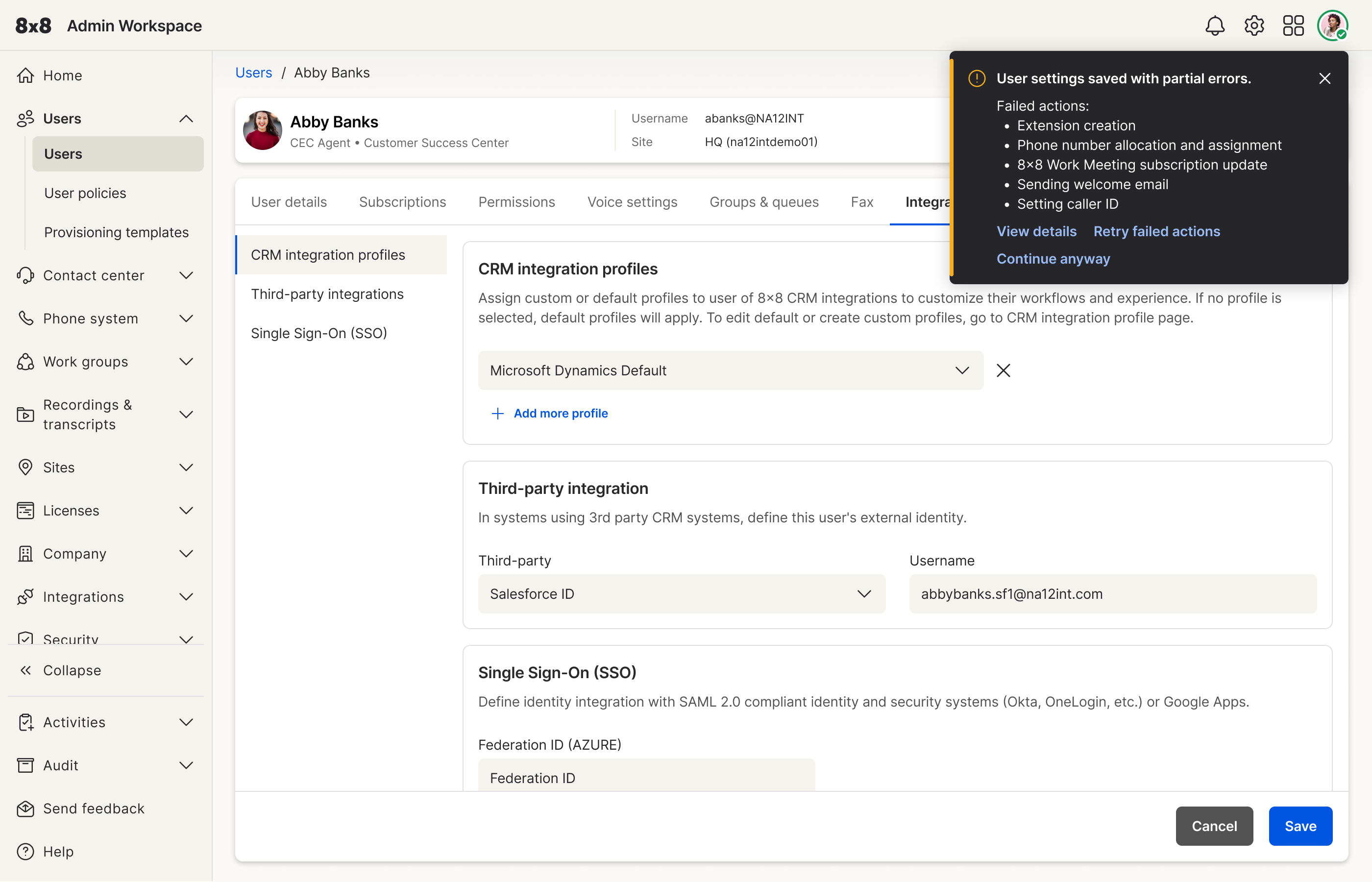
Long-standing pain: if an extension couldn’t be assigned but other features succeeded,
admins were blocked and couldn’t continue. NUME moves remaining work to the background
with visibility to track and troubleshoot.
License-aware UC vs UC+CC
License/subscription selection determines available services. UC+CC licenses (e.g. X8)
surface a dedicated Contact Center tab after Subscription; UC-only
stays on the UC path.
Shipped flow
Create/edit user → subscription/license drives available tabs → Voice and related UC
settings → optional Contact Center tab when required → NUME handles partial telephony
failures without freezing the admin.
NUME: short-term to long-term
NUME was a full-stack effort (backend, frontend, PM, design). Short-term addressed the
blocking failure; long-term states were designed for a fuller background job and task model.
Challenges Faced
Oxygen design-system gaps
Some patterns weren’t in Oxygen (8x8’s design system with production-ready components) —
e.g. table-of-contents-style sub-navigation inside Voice Settings. I designed the
component from scratch, reviewed it with the Oxygen design team, then handed it to
Oxygen engineering before platform eng could use it. That lengthened the
design → system → code cycle.
NUME under distributed constraints
NUME depended on backend feasibility. I used Figma Make for rapid rounds driven by eng
feedback. Clear constraints moved fast; vague “can’t do that” feedback and thin async
replies across time zones slowed decisions. Bi-weekly syncs and async video
walkthroughs helped, but aligning a full-stack recovery model still took longer than
UI polish alone.
Scope boundaries
Admin Workspace unification was paused mid-initiative. Line Key Config spun into its
own project. The create/edit work had to deliver value for UC-only and UC+CC inside
those constraints.
Solution Impact
Tabs reduced cognitive load and held hierarchy (including TOC-style sub-nav where Oxygen
didn’t yet have a component). License selection drives whether Contact Center appears.
NUME turns partial telephony failure from a hard stop into background progress with
visibility — short-term first, long-term designed with the team.
User & Business Impact
Operational
Admins can create and edit users in a tabbed, license-aware flow: UC-only stays on UC
settings; UC+CC surfaces Contact Center when the license requires it. NUME short-term
lets provisioning continue when a step like extension assignment fails, instead of
freezing the admin.
Qualitative proof
Feedback came from 8x8’s existing customer admins and from
usability testing. The clearer structure and non-blocking recovery path
tested well — less confusion about where to configure UC vs CC, and less dead-end friction
when telephony steps partially fail.
No completion-time or success-rate percentage is claimed here; impact is based on
qualitative admin feedback.
.gif)